

English
English
Dark theme
By default every $debug call renders in the browser console and in the Vite terminal. Each line starts with the prefix, MARS-TECH by default (the plugin is published by MARS TECH); set the prefix option to your own app's name to change it. In Vue and Nuxt apps with @vue/devtools-api installed, each call also shows up in Vue DevTools. In any app, an NDJSON log file can be switched on as well. The output option switches each surface on or off. This page covers what the browser console adds over the terminal, the Vue DevTools integration, what reaches the terminal and the NDJSON log file.
The dev terminal can only show text, but the browser console can render live values. So in the browser $debug passes the raw payload to console as a trailing argument, and you get the same interactivity as console.log(value):
document.querySelector(...)): hover-highlight, click to Reveal in Elements; querySelectorAll NodeLists tooError: real name and collapsible stack with clickable framesMap / Set / Date / RegExp / typed arrays: native renderingThe one-line styled summary is still printed as the label, and the dev terminal still receives the (redacted) string form.
Control it:
output.inspect (default true): master switch for the whole app.{ inspect: true } forces the live value even when output.inspect is off; { inspect: false } suppresses it for that call. (An earlier development name, { raw }, is also accepted, with a one-time console warning, until 2.0; inspect wins if both are set.)RegExp entry of redact or redactDefaults is configured, no live value is appended, DOM nodes included (a node's href, its data-* attributes and an input's value would show unmasked): the redacted string form stands alone, so secrets can't slip past redaction into the live object. Use { inspect: true } to override for one call when you know a value is safe. table() and dir(), which have no such switch, print the redacted summary instead of the native table or tree. String entries never reach the browser, so they change none of this. See Live values in the browser.In Vue and Nuxt apps, $debug registers a Vue DevTools plugin so every call also shows up inside Vue DevTools, in the plugin's own tab in the DevTools sidebar (the MARS-TECH logo). That tab is split into State (the inspector) and Timeline.
The inspector is the always-on view: a browsable list of the latest calls (up to 200, newest first), each with a badge for its level. Select one to see its level, message, payload, source location and namespace. Look for the MARS-TECH entry (with its logo) in the Inspector list. In the capture below, the selected call passed { tag: "view/Home" }:
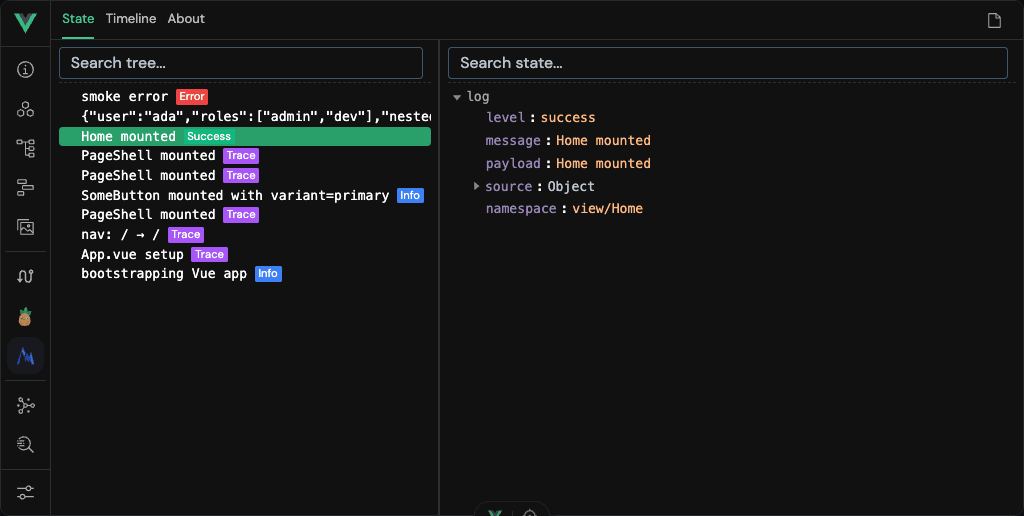
The MARS-TECH timeline layer records one event per call, with its time, its message and source location, and the same details as the inspector.
The timeline records only while armed
Open the MARS-TECH tab → Timeline → click the ● record button in the top-right corner. Until then DevTools drops every event and the view reads No events. The inspector needs no toggle.
Two things routinely make this look broken:
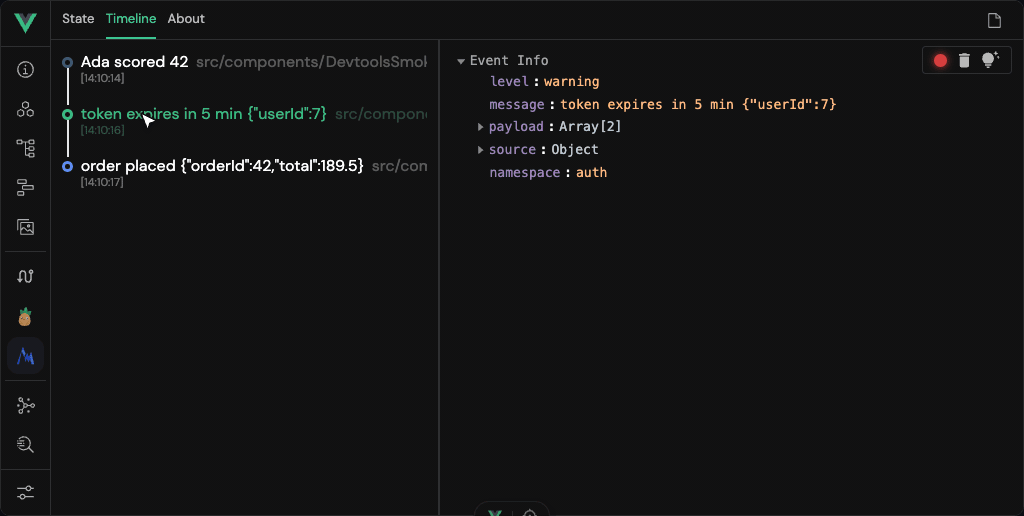
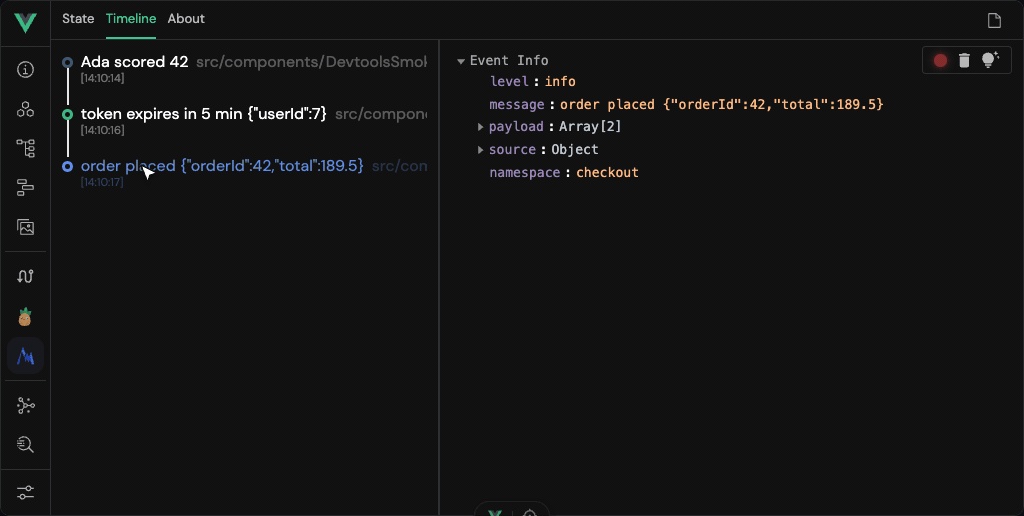
A namespaced logger and a per-call { tag } are the same thing to $debug, and DevTools shows both under one field, named namespace. With these two calls:
const auth = $debug.ns("auth");
auth("warning", "token expires in 5 min", { userId: 7 });

$debug("info", "order placed", { orderId: 42, total: 189.5 }, { tag: "checkout" });
The call through auth, selected in the timeline:
The call with { tag: "checkout" }, selected in the same timeline:
The integration is wired through @vue/devtools-api, declared as an optional peer dependency. It is included only when that package resolves from the Vite root the way Vite resolves it: from a node_modules folder at or above the root. Otherwise it is left out, and the console and terminal output are unaffected; with output: { devtools: true } written explicitly, the dev server says so each time it starts. Pinia or Vue Router may already bring the package in, but under a strict layout such as pnpm's a transitive copy does not resolve from the root. Install it explicitly to guarantee the panel, then restart the dev server:
npm install -D @vue/devtools-apiTurn the integration off with the output: { devtools: false } plugin option. Non-Vue frameworks are unaffected: they keep the full console feature set. (Note: this adds a DevTools presence; a browser page can't programmatically focus the DevTools tab, so there is no "click the console line to jump to the panel".)
With a RegExp entry of redact or redactDefaults configured, DevTools receives the redacted line in place of the payload, even for a call made with { inspect: true } (that flag only brings the live value back in the console). String redact entries never reach the browser, so they mask neither the console nor Vue DevTools. With vite-plugin-vue-devtools registered, the log file stays off. The About tab's view documentation link points at the plugin's README on GitLab.
Browser calls reach the terminal over Vite's HMR channel. Any script running in the page during development can send such log frames, and server code may log request data, so the dev server treats logged text as untrusted:
\r, bidi overrides and the U+2028 / U+2029 separators print as \x1b]52;…, \x0d, \u202e or \u2028, in the terminal and in the log file. Tabs and newlines in a message are kept. A string that already carries ANSI colours (from chalk, say) prints its codes escaped too.tag and prefix at 256, the source file at 1 024. The message, tag and prefix are redacted before they are cut. A field too long to scan is replaced whole, for example a message over 64 KiB by [message omitted: N chars].A page that floods the dev server is rate-limited. Each HMR connection may forward a burst of 10 000 lines, then 2 000 a second, and every connection of the dev server together a burst of 20 000, then 4 000 a second: far more than an app logs, even from a few tabs. A frame over either limit reaches neither the terminal nor the log file; while a page floods, lines from your other tabs are dropped with its own. Only the dev server's copy is limited: the browser console prints every call, and lines from SSR and the Vite process are not counted.
Where stdout is a pipe that does not make Node wait (on macOS, for instance) and its reader does not keep up (vite | tee, a process manager), forwarded lines past 4 MiB of backlog are left out of the terminal; they are still written to the log file.
When anything was dropped, one line every 10 s says how much, for example:
[MARS-TECH] dropped 1240 browser log frames in the last 10 s: the page(s) sent more than 2000 a second on one connection, or 4000 in all.Nothing is printed while nothing is dropped.
Security
Do not use output.file when your code logs secrets, even redacted ones. The log is a file on disk: any tool that reads files can read it, and the plugin's protections are a safety net, not a vault. Keep it for logs that hold no secrets.
For readers that are not a human at a terminal (an AI agent tailing what the app did, a test asserting on output), write every call to a file as well. The file is off by default:
mtDebug({ output: { file: true } }); // .mt-debug/dev.ndjson under the Vite root
mtDebug({ output: { file: "logs/debug.ndjson" } }); // or a path, relative to the root or absolute
mtDebug({ output: { file: process.env.MT_LOG === "1" } }); // a toggle: false (or unset) is off
mtDebug({ output: { file: true, fileMaxBytes: 20 * 2 ** 20 } }); // stop at 20 MiB, not 100
Before you switch it on, read Keeping the log from the page.
One JSON object per line, typed as MTLogLine from @mars-tech/vite-debug-plugin/helpers:
{
  "level": "info",
  "message": "cart loaded",
  "tag": "cart",
  "source": { "file": "src/Cart.vue", "line": 12, "column": 3 },
  "prefix": "MARS-TECH",
  "t": "2026-09-15T10:00:00.000Z",
  "seq": 0,
  "origin": "browser"
}redact.output.terminal: false. SSR calls are captured when the SSR runtime executes inside the Vite process (Vite SSR, vite-node); a separate SSR worker has its own process and is not seen.origin tells them apart: "browser" or "server". seq orders lines within the session; t is the write time.source is the location the terminal shows: the file relative to the Vite root, with /, and a line and column counted from 1, for browser and server lines alike. A browser group() label, table() or dir() line has no source.\u escapes. Still escape a field before printing it to a terminal, and never treat it as instructions.vite.config or .env) starts a new session.warning with origin: "server", saying the limit was reached; that server then writes nothing more to the file until it restarts, and the terminal gets one warning. output.fileMaxBytes sets another limit, in bytes, and Infinity lifts it; null or unset keeps the default, and any other value that is not a number over 0 warns and keeps it.process.env.VITEST set, the file is never opened, so a test run does not truncate the log of a vite dev running beside it. That includes a dev server a test starts itself: to assert on its file, delete process.env.VITEST before it starts. Another tool that starts a dev server from the same config (Storybook's Vite builder, say) does start a new session in the file: switch it off there with a toggle such as file: process.env.MT_LOG === "1".true, false, null or a path (0, {}, ""), warns and leaves the file off for the session; it never fails vite dev.Any script on the page can forge log lines. If it could read the file back, it would see which of its guesses your string redact entries masked, and could recover an entry one character at a time. So the plugin keeps the file from the page. This is a safety net, not a vault:
The plugin blocks every known route to the log. It adds the file to server.fs.deny, answers any HTTP request that reaches it with an empty 403, and refuses it to Vite's module pipeline, the routes over the HMR WebSocket included. Vite reaches a file under the project in many ways; the full list, and how each route is checked, is in the plugin's security policy. A script running in your dev page may still find a route nobody has found yet.
If your code logs secrets, even redacted, do not turn output.file on (see the warning above). A log you keep anyway is safer outside the project: outside server.fs.allow, which in a monorepo is the workspace root, where Vite refuses every file. For example:
import { homedir } from "node:os";
import { join } from "node:path";

mtDebug({ output: { file: join(homedir(), ".mt-debug", "my-app.ndjson") } });
Never put production keys in a dev setup, and run Vite 6.4.2, 7.3.2, 8.0.5 or later: older releases hand a page script any file, your .env included.
The log is not opened at all, with one warning, where Vite or a tool would hand it to the page anyway:
server.fs.strict: false, or with the log inside publicDir;vite-plugin-vue-devtools, Nuxt DevTools, Vite DevTools, devframes, TanStack Devtools. Such a tool reads your .env and your vite.config the same way; the plugin can only decline to add its log to it. If you need the log, run such a tool in a separate dev session. A log an earlier session left stays on disk: delete it before you turn such a tool on;@tailwindcss/vite, unless the log sits in a directory whose .gitignore holds *: Tailwind's scan turns the files it reads into CSS the page fetches.The plugin writes that .gitignore (*) into .mt-debug/ and into a log directory it creates, never over an existing .gitignore. It keeps the log out of git and out of Tailwind's scan without a word from you. A log in an existing directory of yours needs a .gitignore of yours; with @tailwindcss/postcss, which the plugin does not detect, that file is what keeps the log out of Tailwind's scan. More generally, any tool that reads files from disk (Tailwind with an @source that reaches the log, a dev tool, an editor extension) can read the log too, wherever it is: that is beyond the plugin's reach.
Nuxt serves public/ through Nitro, outside Vite: keep the log out of Nuxt's public/. A log an earlier session left is protected only while output.file names it: delete it when you turn the option off.