Dual output
Every call renders in the browser console (styled) and in the Vite terminal (ANSI), with per-level colors, a tag and a source location. In 0.6 that location points inside the plugin's own code, not at your call.
How it works
You are reading the documentation for version 0.6, which is not the latest release.
MARS TECH
An open-source Vite plugin by MARS TECH. One call prints in the browser console and in the Vite terminal, then disappears from your production build, arguments included.


Every call renders in the browser console (styled) and in the Vite terminal (ANSI), with per-level colors, a tag and a source location. In 0.6 that location points inside the plugin's own code, not at your call.
How it works
Every $debug(...) call, method and chained forms included, is rewritten to void 0 at build time and tree-shaken away. Argument expressions never run.
Production behavior
The global is installed on the server too, so router guards, store actions and page setup can log during server-side rendering.
Server-side rendering
Scoped loggers with $debug.ns('auth'). Choose what shows at runtime with enable, disable or setLevel, the ?mt-debug= URL parameter, localStorage or the MT_DEBUG variable, with no restart.
Namespaces and filtering
Mask tokens, email addresses and your own patterns in the browser console, the dev terminal and SSR output alike.
Redacting secrets
console-style helpers: assert, time/timeEnd, count and group/groupEnd, stripped from production builds like the base calls.
Utility helpers
allowDebugBuild ships a dual variant: your library logs in development and is stripped from production builds.
Library authoring
Global types ship in /client for every module-resolution mode, and /eslint provides a flat config that declares the $debug global.
Quickstart
npm install -D @mars-tech/vite-debug-pluginpnpm add -D @mars-tech/vite-debug-pluginyarn add -D @mars-tech/vite-debug-pluginThen register the plugin in vite.config.ts:
// vite.config.ts
import { defineConfig } from "vite";
import mtDebug from "@mars-tech/vite-debug-plugin";

export default defineConfig({
  plugins: [mtDebug()],
});
The Quickstart adds the global type and the ESLint configuration.
The demo below follows a Vue app through three pages. Each line starts with MARS-TECH, the default prefix of this MARS TECH plugin; the prefix option replaces it with your own.
Start the dev server. Start the dev server, open the app and press +1 twice. Every $debug call, first while the app boots and then in the Pinia store action, prints the same line in the browser console and in the Vite terminal: level, tag, message and a source location. In 0.6, a call made in the browser reports the plugin’s own runtime module as its location instead of the call site; version 1.0 fixes this.
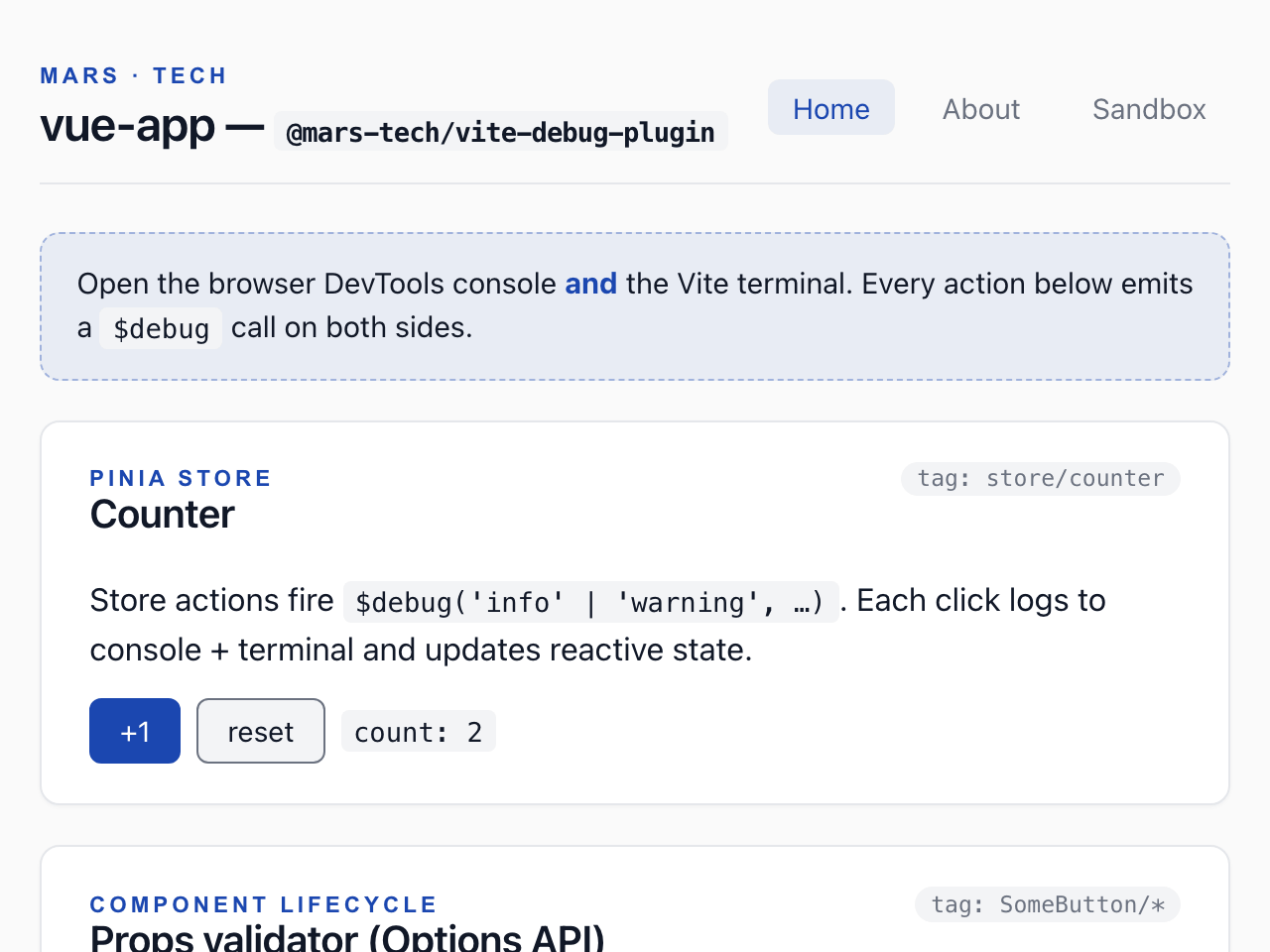
$ npm run dev -- --port 4312 --strictPort
MARS-TECH Info [main] - bootstrapping Vue app (http://localhost:4312/@mars-tech-vite-debug/runtime:201:3)
MARS-TECH Trace [component/App] - App.vue setup (http://localhost:4312/@mars-tech-vite-debug/runtime:201:3)
MARS-TECH Trace [router/beforeEach] - nav: / → / (http://localhost:4312/@mars-tech-vite-debug/runtime:201:3)
MARS-TECH Trace [shell/mounted] - PageShell mounted (http://localhost:4312/@mars-tech-vite-debug/runtime:201:3)
MARS-TECH Info [SomeButton/mounted] - SomeButton mounted with variant=primary (http://localhost:4312/@mars-tech-vite-debug/runtime:201:3)
MARS-TECH Trace [shell/mounted] - PageShell mounted (http://localhost:4312/@mars-tech-vite-debug/runtime:201:3)
MARS-TECH Trace [shell/mounted] - PageShell mounted (http://localhost:4312/@mars-tech-vite-debug/runtime:201:3)
MARS-TECH Success [view/Home] - Home mounted (http://localhost:4312/@mars-tech-vite-debug/runtime:201:3)
MARS-TECH Info [store/counter] - counter incremented to 1 (http://localhost:4312/@mars-tech-vite-debug/runtime:201:3)
MARS-TECH Info [store/counter] - counter incremented to 2 (http://localhost:4312/@mars-tech-vite-debug/runtime:201:3)
Navigate to another page. Open the About page and press Fire delayed (500 ms). Lifecycle hooks, a method called after a timer and a watcher all log through $debug.
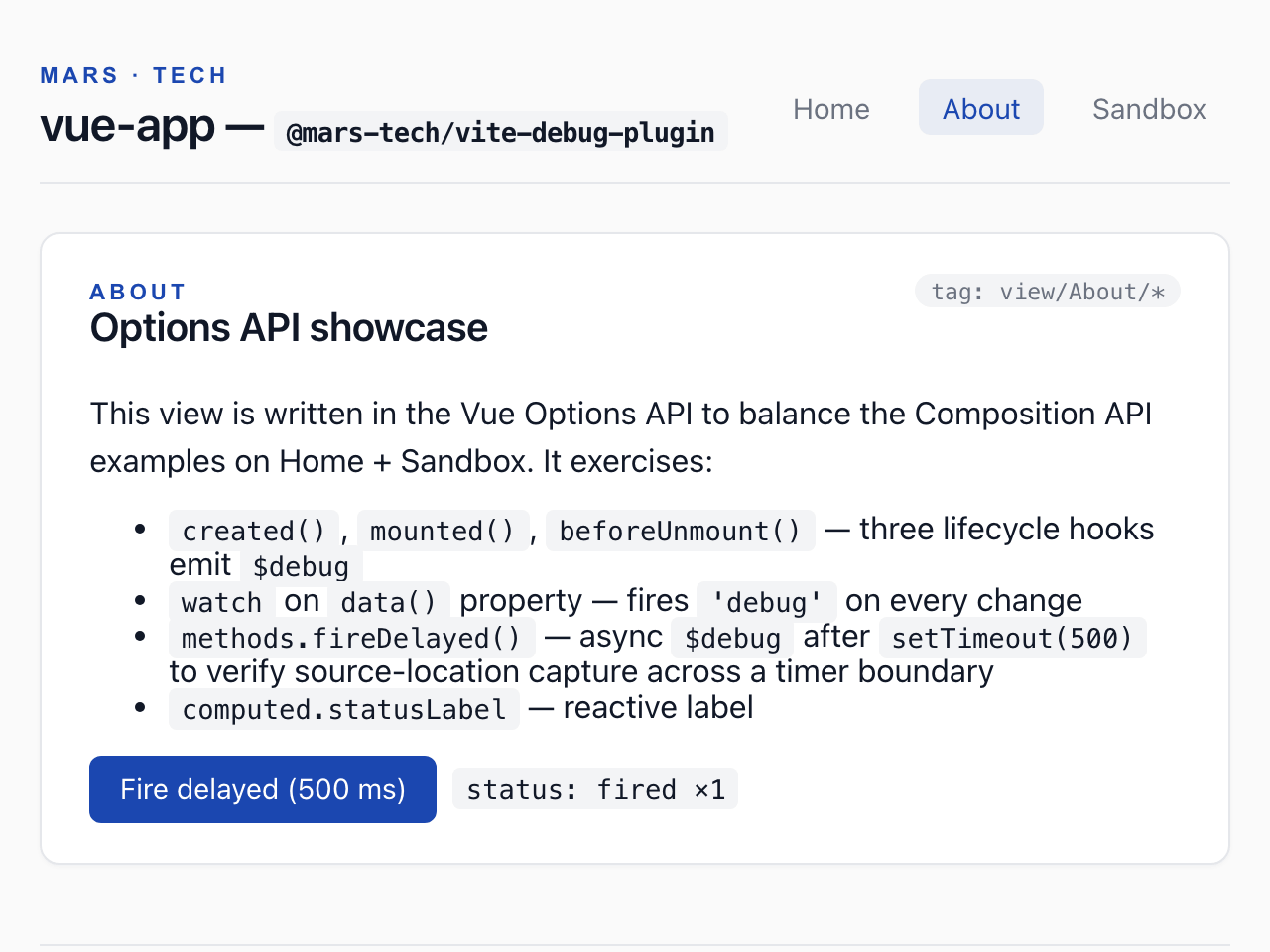
MARS-TECH Trace [router/beforeEach] - nav: / → /about (http://localhost:4312/@mars-tech-vite-debug/runtime:201:3)
MARS-TECH Trace [view/About/lifecycle] - About created (http://localhost:4312/@mars-tech-vite-debug/runtime:201:3)
MARS-TECH Trace [shell/mounted] - PageShell mounted (http://localhost:4312/@mars-tech-vite-debug/runtime:201:3)
MARS-TECH Success [view/About/lifecycle] - About mounted (http://localhost:4312/@mars-tech-vite-debug/runtime:201:3)
MARS-TECH Info [view/About/method] - delayed fire #1 (http://localhost:4312/@mars-tech-vite-debug/runtime:201:3)
MARS-TECH Debug [view/About/watch] - delayedCount: 0 → 1 (http://localhost:4312/@mars-tech-vite-debug/runtime:201:3)
Hit an error. Open the Sandbox page and press Throw + log. Leaving About logs its beforeUnmount warning, and the caught error is logged with its stack trace.
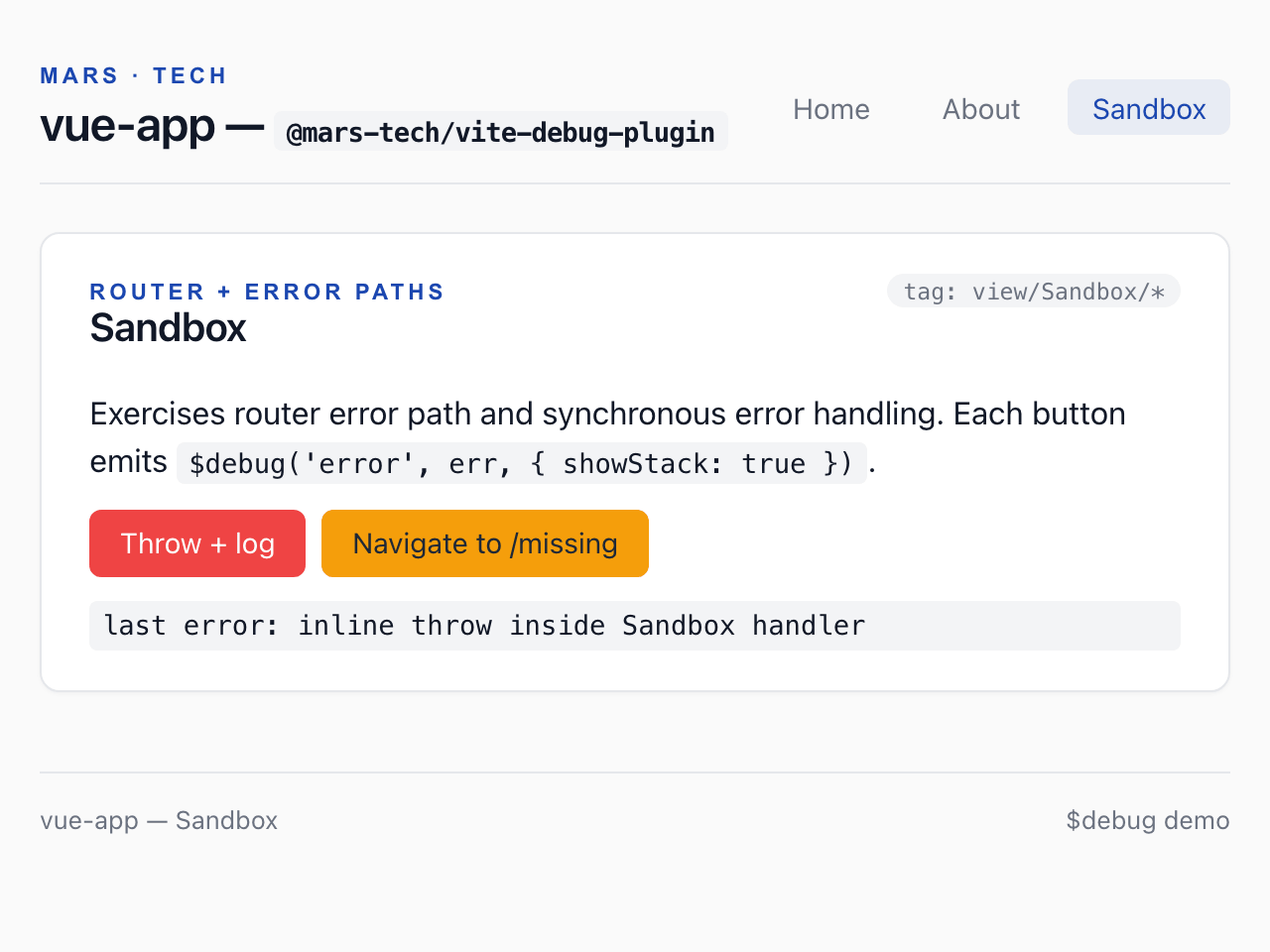
MARS-TECH Trace [router/beforeEach] - nav: /about → /sandbox (http://localhost:4312/@mars-tech-vite-debug/runtime:201:3)
MARS-TECH Warning [view/About/lifecycle] - About beforeUnmount (http://localhost:4312/@mars-tech-vite-debug/runtime:201:3)
MARS-TECH Trace [shell/mounted] - PageShell mounted (http://localhost:4312/@mars-tech-vite-debug/runtime:201:3)
MARS-TECH Trace [view/Sandbox] - Sandbox mounted (http://localhost:4312/@mars-tech-vite-debug/runtime:201:3)
MARS-TECH Error [view/Sandbox/handler] - inline throw inside Sandbox handler (http://localhost:4312/@mars-tech-vite-debug/runtime:201:3)
  Error: inline throw inside Sandbox handler
      at throwInline (http://localhost:4312/src/views/Sandbox.vue:38:11)
      at callWithErrorHandling (http://localhost:4312/node_modules/.vite/deps/vue.runtime.esm-bundler-BbnC8aGa.js?v=ad0296fb:1889:17)
      at callWithAsyncErrorHandling (http://localhost:4312/node_modules/.vite/deps/vue.runtime.esm-bundler-BbnC8aGa.js?v=ad0296fb:1896:15)
at HTMLButtonElement.invoker (http://localhost:4312/node_modules/.vite/deps/vue.runtime.esm-bundler-BbnC8aGa.js?v=ad0296fb:7677:10)The browser console and the Vite terminal print the same lines. In the browser the level is coloured and the source location is in italics; in the terminal the source location is dimmed. A stack trace follows its line in the terminal, and sits in a collapsed “stack” group in the console.
Step 1 of 3 — Start the dev server. Start the dev server, open the app and press +1 twice. Every $debug call, first while the app boots and then in the Pinia store action, prints the same line in the browser console and in the Vite terminal: level, tag, message and a source location. In 0.6, a call made in the browser reports the plugin’s own runtime module as its location instead of the call site; version 1.0 fixes this.
Output:
$ npm run dev -- --port 4312 --strictPort
MARS-TECH Info [main] - bootstrapping Vue app (http://localhost:4312/@mars-tech-vite-debug/runtime:201:3)
MARS-TECH Trace [component/App] - App.vue setup (http://localhost:4312/@mars-tech-vite-debug/runtime:201:3)
MARS-TECH Trace [router/beforeEach] - nav: / → / (http://localhost:4312/@mars-tech-vite-debug/runtime:201:3)
MARS-TECH Trace [shell/mounted] - PageShell mounted (http://localhost:4312/@mars-tech-vite-debug/runtime:201:3)
MARS-TECH Info [SomeButton/mounted] - SomeButton mounted with variant=primary (http://localhost:4312/@mars-tech-vite-debug/runtime:201:3)
MARS-TECH Trace [shell/mounted] - PageShell mounted (http://localhost:4312/@mars-tech-vite-debug/runtime:201:3)
MARS-TECH Trace [shell/mounted] - PageShell mounted (http://localhost:4312/@mars-tech-vite-debug/runtime:201:3)
MARS-TECH Success [view/Home] - Home mounted (http://localhost:4312/@mars-tech-vite-debug/runtime:201:3)
MARS-TECH Info [store/counter] - counter incremented to 1 (http://localhost:4312/@mars-tech-vite-debug/runtime:201:3)
MARS-TECH Info [store/counter] - counter incremented to 2 (http://localhost:4312/@mars-tech-vite-debug/runtime:201:3)
Step 2 of 3 — Navigate to another page. Open the About page and press Fire delayed (500 ms). Lifecycle hooks, a method called after a timer and a watcher all log through $debug.
Output:
MARS-TECH Trace [router/beforeEach] - nav: / → /about (http://localhost:4312/@mars-tech-vite-debug/runtime:201:3)
MARS-TECH Trace [view/About/lifecycle] - About created (http://localhost:4312/@mars-tech-vite-debug/runtime:201:3)
MARS-TECH Trace [shell/mounted] - PageShell mounted (http://localhost:4312/@mars-tech-vite-debug/runtime:201:3)
MARS-TECH Success [view/About/lifecycle] - About mounted (http://localhost:4312/@mars-tech-vite-debug/runtime:201:3)
MARS-TECH Info [view/About/method] - delayed fire #1 (http://localhost:4312/@mars-tech-vite-debug/runtime:201:3)
MARS-TECH Debug [view/About/watch] - delayedCount: 0 → 1 (http://localhost:4312/@mars-tech-vite-debug/runtime:201:3)
Step 3 of 3 — Hit an error. Open the Sandbox page and press Throw + log. Leaving About logs its beforeUnmount warning, and the caught error is logged with its stack trace.
Output:
MARS-TECH Trace [router/beforeEach] - nav: /about → /sandbox (http://localhost:4312/@mars-tech-vite-debug/runtime:201:3)
MARS-TECH Warning [view/About/lifecycle] - About beforeUnmount (http://localhost:4312/@mars-tech-vite-debug/runtime:201:3)
MARS-TECH Trace [shell/mounted] - PageShell mounted (http://localhost:4312/@mars-tech-vite-debug/runtime:201:3)
MARS-TECH Trace [view/Sandbox] - Sandbox mounted (http://localhost:4312/@mars-tech-vite-debug/runtime:201:3)
MARS-TECH Error [view/Sandbox/handler] - inline throw inside Sandbox handler (http://localhost:4312/@mars-tech-vite-debug/runtime:201:3)
  Error: inline throw inside Sandbox handler
      at throwInline (http://localhost:4312/src/views/Sandbox.vue:38:11)
      at callWithErrorHandling (http://localhost:4312/node_modules/.vite/deps/vue.runtime.esm-bundler-BbnC8aGa.js?v=ad0296fb:1889:17)
      at callWithAsyncErrorHandling (http://localhost:4312/node_modules/.vite/deps/vue.runtime.esm-bundler-BbnC8aGa.js?v=ad0296fb:1896:15)
      at HTMLButtonElement.invoker (http://localhost:4312/node_modules/.vite/deps/vue.runtime.esm-bundler-BbnC8aGa.js?v=ad0296fb:7677:10)
The How it works guide walks through the same flow and explains what happens to each call in a production build.