
Aller au contenu

Vous lisez la documentation de la version 0.6, qui n'est pas la dernière publiée.

MARS TECH

@mars-tech/vite-debug-pluginUn $debug() global en développement, absent en production

Un plugin Vite libre, conçu par MARS TECH. Un seul appel s'affiche dans la console du navigateur et dans le terminal Vite, puis disparaît de la compilation de production, arguments compris.

Installation

sh
npm install -D @mars-tech/vite-debug-plugin
sh
pnpm add -D @mars-tech/vite-debug-plugin
sh
yarn add -D @mars-tech/vite-debug-plugin

Enregistrez ensuite le plugin dans vite.config.ts :

ts
// vite.config.ts
import { defineConfig } from "vite";
import mtDebug from "@mars-tech/vite-debug-plugin";

export default defineConfig({
  plugins: [mtDebug()],
});

Le démarrage rapide ajoute le typage de la globale et la configuration ESLint.

Comment ça marche

La démonstration ci-dessous suit une application Vue sur trois pages. Chaque ligne commence par MARS-TECH, le préfixe par défaut de ce plugin MARS TECH ; l'option prefix le remplace par le vôtre.

Fonctionnement du plugin en 3 étapes : les mêmes appels $debug() affichés dans la console du navigateur et dans le terminal Vite.

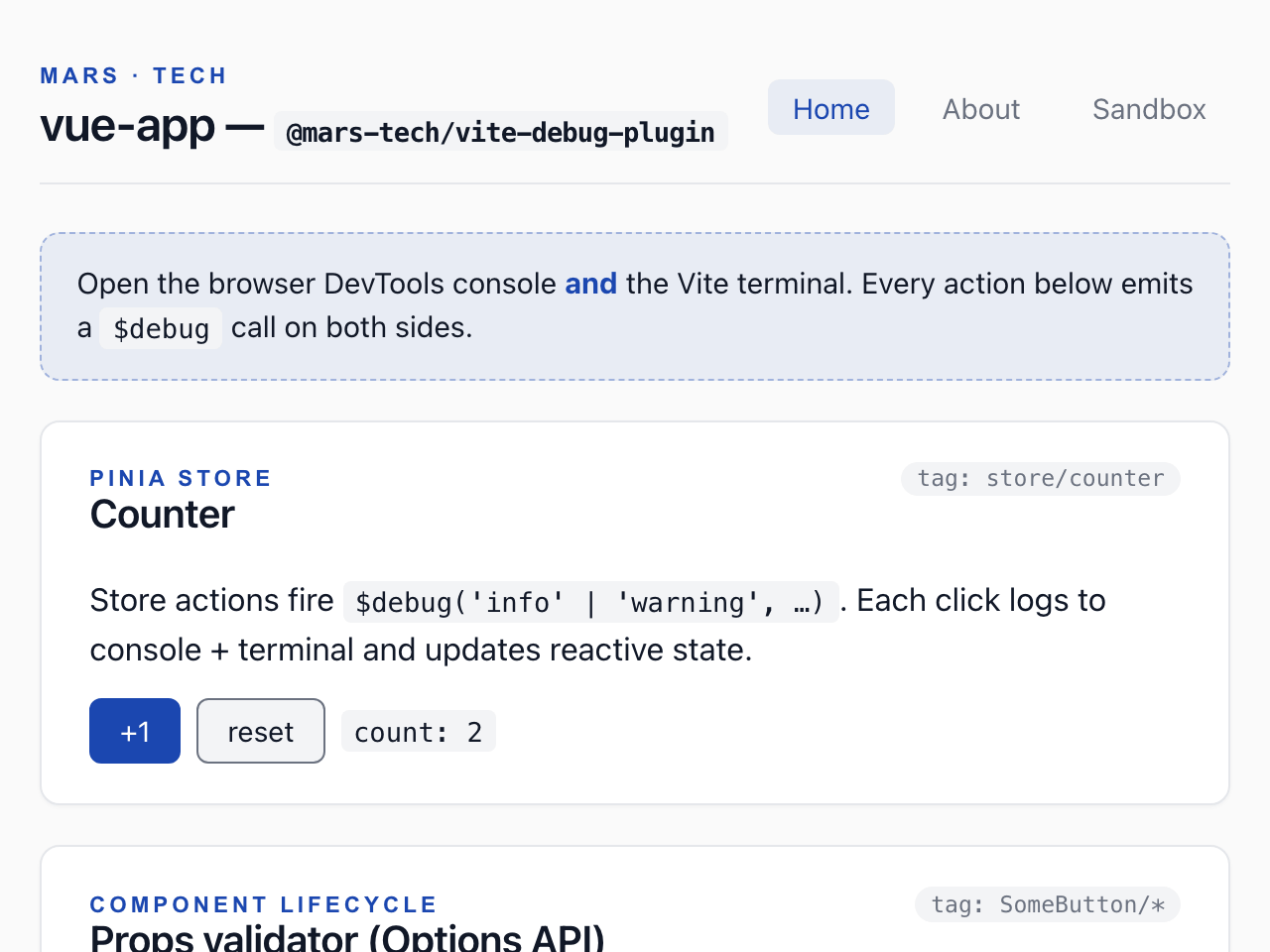
Lancer le serveur de développement. Lancez le serveur de développement, ouvrez l’application et cliquez deux fois sur +1. Chaque appel à $debug, d’abord au démarrage de l’application puis dans l’action du store Pinia, affiche la même ligne dans la console du navigateur et dans le terminal Vite : niveau, étiquette, message et un emplacement source. En 0.6, un appel fait dans le navigateur indique comme emplacement le module d’exécution du plugin lui-même au lieu de l’endroit de l’appel ; la version 1.0 corrige ce défaut.

Adresse dans le navigateur :localhost:4312/
Application Vue de démonstration, page d’accueil : l’en-tête et ses trois liens de navigation, un bandeau invitant à ouvrir la console du navigateur et le terminal Vite, puis la carte du compteur Pinia, qui affiche 2 après deux clics sur +1.
Console du navigateur — La console du navigateur affiche les mêmes lignes que le terminal.
Terminal — vite dev
$ npm run dev -- --port 4312 --strictPort
MARS-TECH Info [main] - bootstrapping Vue app (http://localhost:4312/@mars-tech-vite-debug/runtime:201:3)
MARS-TECH Trace [component/App] - App.vue setup (http://localhost:4312/@mars-tech-vite-debug/runtime:201:3)
MARS-TECH Trace [router/beforeEach] - nav: / → / (http://localhost:4312/@mars-tech-vite-debug/runtime:201:3)
MARS-TECH Trace [shell/mounted] - PageShell mounted (http://localhost:4312/@mars-tech-vite-debug/runtime:201:3)
MARS-TECH Info [SomeButton/mounted] - SomeButton mounted with variant=primary (http://localhost:4312/@mars-tech-vite-debug/runtime:201:3)
MARS-TECH Trace [shell/mounted] - PageShell mounted (http://localhost:4312/@mars-tech-vite-debug/runtime:201:3)
MARS-TECH Success [view/Home] - Home mounted (http://localhost:4312/@mars-tech-vite-debug/runtime:201:3)
MARS-TECH Info [store/counter] - counter incremented to 1 (http://localhost:4312/@mars-tech-vite-debug/runtime:201:3)
MARS-TECH Info [store/counter] - counter incremented to 2 (http://localhost:4312/@mars-tech-vite-debug/runtime:201:3)

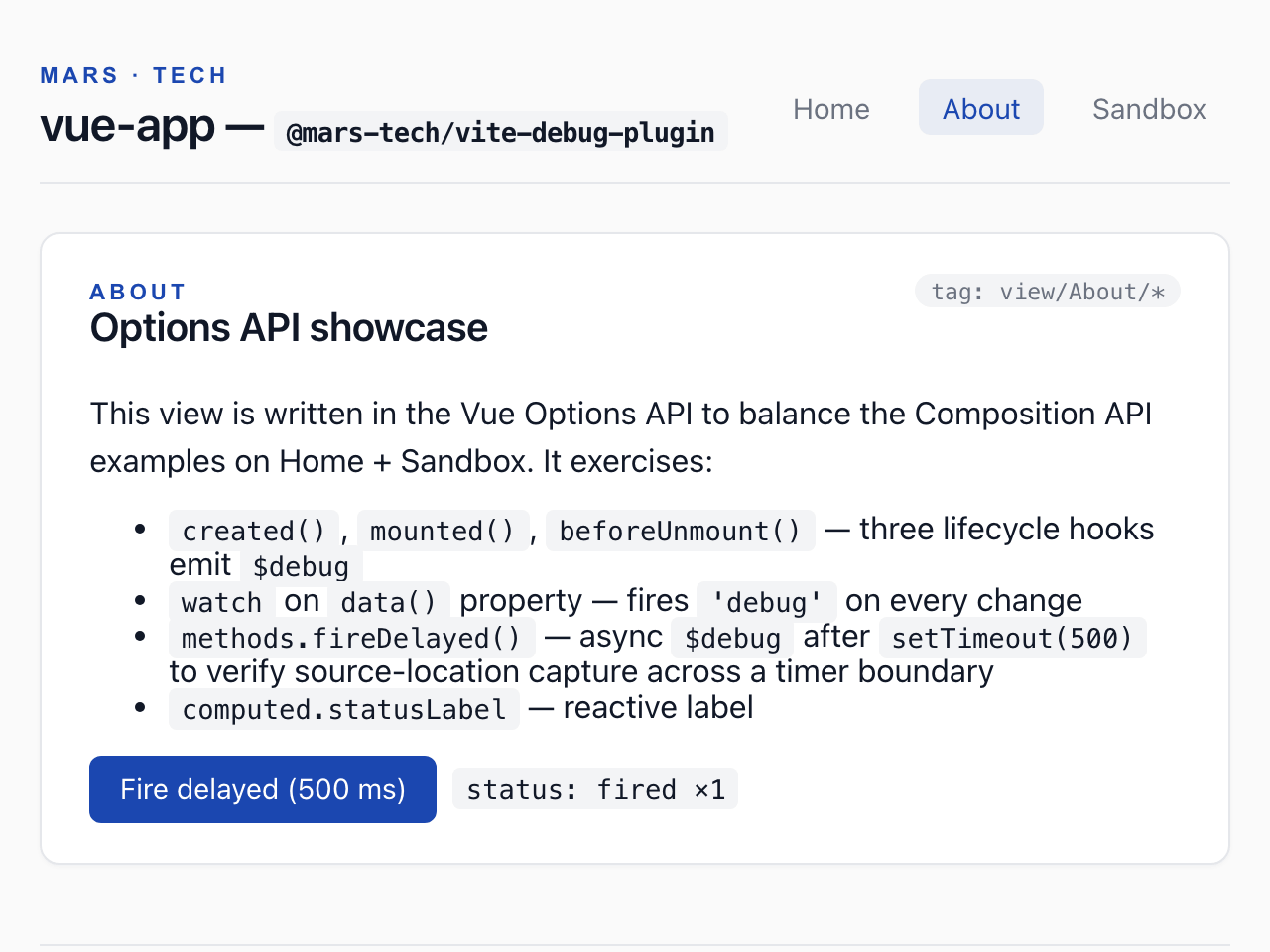
Naviguer vers une autre page. Ouvrez la page About et cliquez sur Fire delayed (500 ms). Les hooks de cycle de vie, une méthode appelée après un minuteur et un observateur journalisent tous via $debug.

Adresse dans le navigateur :localhost:4312/about
Application Vue de démonstration, page À propos : une carte de démonstration de l’API Options qui liste les étapes du cycle de vie, un observateur, une méthode asynchrone et un libellé calculé ; après un clic sur le bouton de déclenchement différé (500 ms), l’état indique un déclenchement.
Console du navigateur — La console du navigateur affiche les mêmes lignes que le terminal.
Terminal — vite dev
MARS-TECH Trace [router/beforeEach] - nav: / → /about (http://localhost:4312/@mars-tech-vite-debug/runtime:201:3)
MARS-TECH Trace [view/About/lifecycle] - About created (http://localhost:4312/@mars-tech-vite-debug/runtime:201:3)
MARS-TECH Trace [shell/mounted] - PageShell mounted (http://localhost:4312/@mars-tech-vite-debug/runtime:201:3)
MARS-TECH Success [view/About/lifecycle] - About mounted (http://localhost:4312/@mars-tech-vite-debug/runtime:201:3)
MARS-TECH Info [view/About/method] - delayed fire #1 (http://localhost:4312/@mars-tech-vite-debug/runtime:201:3)
MARS-TECH Debug [view/About/watch] - delayedCount: 0 → 1 (http://localhost:4312/@mars-tech-vite-debug/runtime:201:3)

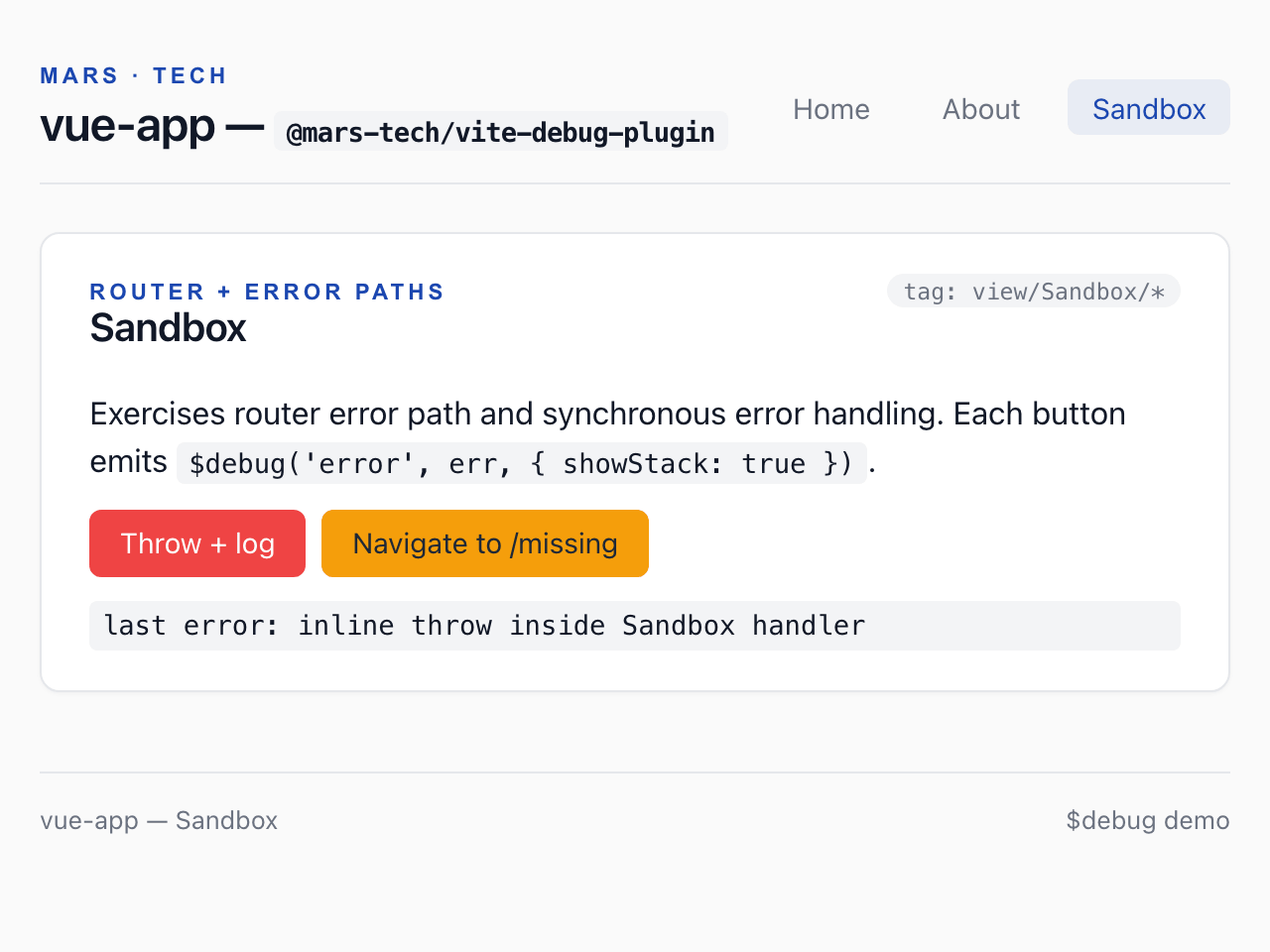
Provoquer une erreur. Ouvrez la page Sandbox et cliquez sur Throw + log. Quitter la page About journalise son avertissement beforeUnmount, et l’erreur interceptée est journalisée avec sa pile d’appels.

Adresse dans le navigateur :localhost:4312/sandbox
Application Vue de démonstration, page Bac à sable : une carte sur le routeur et les chemins d’erreur, avec un bouton qui lève et journalise une erreur et un bouton de navigation vers /missing ; dessous, le message de la dernière erreur interceptée.
Console du navigateur — La console du navigateur affiche les mêmes lignes que le terminal.
Terminal — vite dev
MARS-TECH Trace [router/beforeEach] - nav: /about → /sandbox (http://localhost:4312/@mars-tech-vite-debug/runtime:201:3)
MARS-TECH Warning [view/About/lifecycle] - About beforeUnmount (http://localhost:4312/@mars-tech-vite-debug/runtime:201:3)
MARS-TECH Trace [shell/mounted] - PageShell mounted (http://localhost:4312/@mars-tech-vite-debug/runtime:201:3)
MARS-TECH Trace [view/Sandbox] - Sandbox mounted (http://localhost:4312/@mars-tech-vite-debug/runtime:201:3)
MARS-TECH Error [view/Sandbox/handler] - inline throw inside Sandbox handler (http://localhost:4312/@mars-tech-vite-debug/runtime:201:3)
  Error: inline throw inside Sandbox handler
      at throwInline (http://localhost:4312/src/views/Sandbox.vue:38:11)
      at callWithErrorHandling (http://localhost:4312/node_modules/.vite/deps/vue.runtime.esm-bundler-BbnC8aGa.js?v=ad0296fb:1889:17)
      at callWithAsyncErrorHandling (http://localhost:4312/node_modules/.vite/deps/vue.runtime.esm-bundler-BbnC8aGa.js?v=ad0296fb:1896:15)
      at HTMLButtonElement.invoker (http://localhost:4312/node_modules/.vite/deps/vue.runtime.esm-bundler-BbnC8aGa.js?v=ad0296fb:7677:10)
Version texte de cette animation

La console du navigateur et le terminal Vite affichent les mêmes lignes. Dans le navigateur, le niveau est coloré et l’emplacement source est en italique ; dans le terminal, l’emplacement source est grisé. Une pile d’appels suit sa ligne dans le terminal et se trouve dans un groupe « stack » replié dans la console.

  1. Étape 1 sur 3 — Lancer le serveur de développement. Lancez le serveur de développement, ouvrez l’application et cliquez deux fois sur +1. Chaque appel à $debug, d’abord au démarrage de l’application puis dans l’action du store Pinia, affiche la même ligne dans la console du navigateur et dans le terminal Vite : niveau, étiquette, message et un emplacement source. En 0.6, un appel fait dans le navigateur indique comme emplacement le module d’exécution du plugin lui-même au lieu de l’endroit de l’appel ; la version 1.0 corrige ce défaut.

    Sortie :

    $ npm run dev -- --port 4312 --strictPort
    MARS-TECH Info [main] - bootstrapping Vue app (http://localhost:4312/@mars-tech-vite-debug/runtime:201:3)
    MARS-TECH Trace [component/App] - App.vue setup (http://localhost:4312/@mars-tech-vite-debug/runtime:201:3)
    MARS-TECH Trace [router/beforeEach] - nav: / → / (http://localhost:4312/@mars-tech-vite-debug/runtime:201:3)
    MARS-TECH Trace [shell/mounted] - PageShell mounted (http://localhost:4312/@mars-tech-vite-debug/runtime:201:3)
    MARS-TECH Info [SomeButton/mounted] - SomeButton mounted with variant=primary (http://localhost:4312/@mars-tech-vite-debug/runtime:201:3)
    MARS-TECH Trace [shell/mounted] - PageShell mounted (http://localhost:4312/@mars-tech-vite-debug/runtime:201:3)
    MARS-TECH Trace [shell/mounted] - PageShell mounted (http://localhost:4312/@mars-tech-vite-debug/runtime:201:3)
    MARS-TECH Success [view/Home] - Home mounted (http://localhost:4312/@mars-tech-vite-debug/runtime:201:3)
    MARS-TECH Info [store/counter] - counter incremented to 1 (http://localhost:4312/@mars-tech-vite-debug/runtime:201:3)
    MARS-TECH Info [store/counter] - counter incremented to 2 (http://localhost:4312/@mars-tech-vite-debug/runtime:201:3)
  2. Étape 2 sur 3 — Naviguer vers une autre page. Ouvrez la page About et cliquez sur Fire delayed (500 ms). Les hooks de cycle de vie, une méthode appelée après un minuteur et un observateur journalisent tous via $debug.

    Sortie :

    MARS-TECH Trace [router/beforeEach] - nav: / → /about (http://localhost:4312/@mars-tech-vite-debug/runtime:201:3)
    MARS-TECH Trace [view/About/lifecycle] - About created (http://localhost:4312/@mars-tech-vite-debug/runtime:201:3)
    MARS-TECH Trace [shell/mounted] - PageShell mounted (http://localhost:4312/@mars-tech-vite-debug/runtime:201:3)
    MARS-TECH Success [view/About/lifecycle] - About mounted (http://localhost:4312/@mars-tech-vite-debug/runtime:201:3)
    MARS-TECH Info [view/About/method] - delayed fire #1 (http://localhost:4312/@mars-tech-vite-debug/runtime:201:3)
    MARS-TECH Debug [view/About/watch] - delayedCount: 0 → 1 (http://localhost:4312/@mars-tech-vite-debug/runtime:201:3)
  3. Étape 3 sur 3 — Provoquer une erreur. Ouvrez la page Sandbox et cliquez sur Throw + log. Quitter la page About journalise son avertissement beforeUnmount, et l’erreur interceptée est journalisée avec sa pile d’appels.

    Sortie :

    MARS-TECH Trace [router/beforeEach] - nav: /about → /sandbox (http://localhost:4312/@mars-tech-vite-debug/runtime:201:3)
    MARS-TECH Warning [view/About/lifecycle] - About beforeUnmount (http://localhost:4312/@mars-tech-vite-debug/runtime:201:3)
    MARS-TECH Trace [shell/mounted] - PageShell mounted (http://localhost:4312/@mars-tech-vite-debug/runtime:201:3)
    MARS-TECH Trace [view/Sandbox] - Sandbox mounted (http://localhost:4312/@mars-tech-vite-debug/runtime:201:3)
    MARS-TECH Error [view/Sandbox/handler] - inline throw inside Sandbox handler (http://localhost:4312/@mars-tech-vite-debug/runtime:201:3)
      Error: inline throw inside Sandbox handler
          at throwInline (http://localhost:4312/src/views/Sandbox.vue:38:11)
          at callWithErrorHandling (http://localhost:4312/node_modules/.vite/deps/vue.runtime.esm-bundler-BbnC8aGa.js?v=ad0296fb:1889:17)
          at callWithAsyncErrorHandling (http://localhost:4312/node_modules/.vite/deps/vue.runtime.esm-bundler-BbnC8aGa.js?v=ad0296fb:1896:15)
          at HTMLButtonElement.invoker (http://localhost:4312/node_modules/.vite/deps/vue.runtime.esm-bundler-BbnC8aGa.js?v=ad0296fb:7677:10)

Le guide « Comment ça marche » reprend ces étapes et explique ce que devient chaque appel dans la compilation de production.